Intro
So I have always wanted to actually write some high privilage code on a large system like Linux, so this is something I am going to have so much fun doing.
My senior design project (RootView) is currently using the KVMI fork in order to get VM introspection from the hypervisor on a desktop. Which is cool, but not being able to actually work with KVM and only calling a read_phys_mem() API function was lowkey lame, so I randomly decided to expand the scope of the project to support Android phones. As I did more research, I came started learning about the AVF and learned that pKVM was actually a pretty new addition (2022/2023). When looking deeper, I found that there was no existing tool that did what KVMI does for pKVM (because it is literally circumventing pKVM’s whole purpose lol) so my goofy ass decided to start one. And better yet, I don’t need to make a pKVM fork because it allows for vendor modules!!! Once I learned this, I bought a shitty $100 pixel 7 phone from ebay.
So what are we doing?
First I had Mr. Claude set up a development environment because that shit would take multiple days to do by hand, plus I know what to do I just need to figure out specific flags and other bullshit. I had it set up an ARM64 (not aarch64, fuck you (jk)) emulation with pKVM running in EL2 and the Linux kernel on EL1.
From there I wrote a “hello world” setup with a userspace module calling a kernel module I wrote via an ioctl(), then that one inits and calls the pKVM module via a hypercall pkvm_el2_mod_call(hvc), that should return 67 and if so, the kernel module will do a copy_to_user() call stating that the hypercall and init all worked and boom.
I literally just followed the android docs for writing the hypervisor module communicating with the kernel module. For this I didn’t have to do anything Android specific, just had to tell QEMU to load the pKVM modules via kvm-arm.protected_modules=<modules> in the exec. It is very similar to the bs that I had to deal with the phone. I also had the clanker write me some scripts.
Now I just need to do this process for the phone and do the android specific stuff!!
Flashing your own GKI
So for me to be able to write my own priviliged code into a Pixel phone, I first need to unlock the bootloader so I can flash custom builds. That was a straight forward process with lots of tutorials out there, it is literally like 2 fastboot commands and having to set your phone in developer mode. Once you unlock the bootloader, your phone will be wiped, so you will have to set up the phone all over again with developer mode.
Now with that, I can now run adb reboot fastboot and stop right at fastboot, then I can run fastboot flash <dst component> <src img>. At first I lowkey thought that I would need to compile all of the AOSP which would be like 300GB but luckily all I need to build is the GKI and then flash that!!
With that, I had to build the kernel for my pixel phone, the way I did that was by getting the open source pantah build repository that comes with a bunch of build scripts.
But before I start talking about the kernel build modifications, I gotta talk about how the AVF boot process works so you can understand what is going to happen next
AVF quickstart
So before AVF was a thing, the way that the overarching Android architecture was designed was through VHE (Virtualization Host Extensions), which had your main host OS (Android) have full privilages and itself would be in charge of spawning VM’s that are usually used to handle sensitive and confidential info.
The problem with that is that if the android OS is compromised, an attacker can still read what is going on in the other VM’s. So because of that the AVF architecture came to be, using a concept called nVHE with pKVM running at its core in EL2, deprivilaging and treating your main Android host ass just another VM. This makes it so that even if it is compromised, pKVM will have to be compromised in order for an attacker to view what is going on in those VMs. And pKVM is small as fuck so I doubt there even is much space for that to happen, only through faulty vendor modules.
The way that it works during the boot process is the bootloader will bring up the GKI, it will then set up pKVM with the vendor modules, and then deprivilage itself into EL1. You can read more about it here
Hello from EL2 - Pixel Edition
After understanding how the architecture works at a high-level, we can start to flash stuff more confidently. What we flash is a few different images:
- in the kernel
fastbootstage:boot.img- the main GKI kernelvendor_kernel_boot.img- this one holds the early boot modules that we wrote, along with info on how they get loaded, etcdtbo.img- the device tree blob (object??) idk what the “o” stands for
- in the user
fastbootd:vendor_dklm.img- this has vendor driverssystem_dklm.img- GKI modules
From there I started building the kernel images and flashing them. Sometimes I would fuck something up and I would have an infinite loop, when that would happen I would just hold the volume down button to stop at fastboot again and redo the flash. One example of a fuckup was there was an kvm-arm.protected_modules=... already later on inside the bootargs and instead what I did was add it in the beginning, which would cause it to be ignored by the already existing one later on.
I also needed to copy my hello-hvc directory into the pkvm/ directory and write in the BUILD.bazel that i needed to compile it into a kernel object and then also write its build path into vendor_ramdisk.modules.pantah so that the build process can link it into the image.
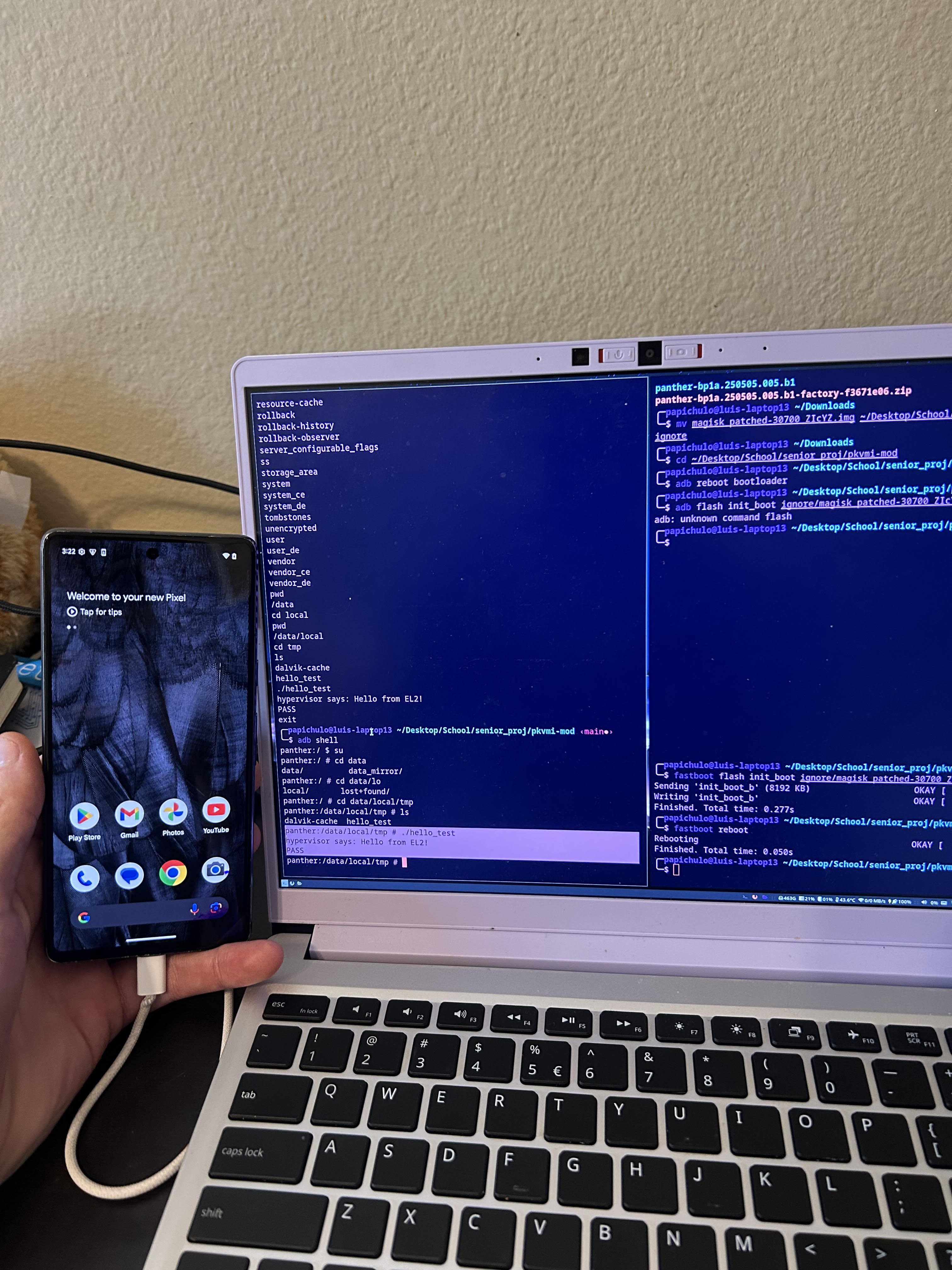
With that, I had code running in EL2 and EL1! Now I just needed root on the phone to have the ability to write and run a userspace module that does the initial ioctl() call. I just used Magisk, there are plenty of resources that show you how to do it.